Documentation
OKF and LLM Wiki
Knowledge pages with inspectable provenance — the Wiki view, creating and checking a bundle, proposals and limits.
An OKF Wiki Bundle is a folder of Markdown files in the Open Knowledge Format (OKF v0.2). It is not a database format or an export; the same files can be opened in Obsidian and committed to git. Everything runs locally, without a model and without a network.
Why it matters
AI-written documentation can sound authoritative while being difficult to verify. OKF records the origin of every page:
- Trust tier: reviewed by a human, AI-generated and unreviewed, or unattributed.
- Sources with content hashes. If a source changes, the page is marked as drifted.
- Lifecycle: draft, stable, or deprecated, with an optional expiry date.
The Wiki view at a glance
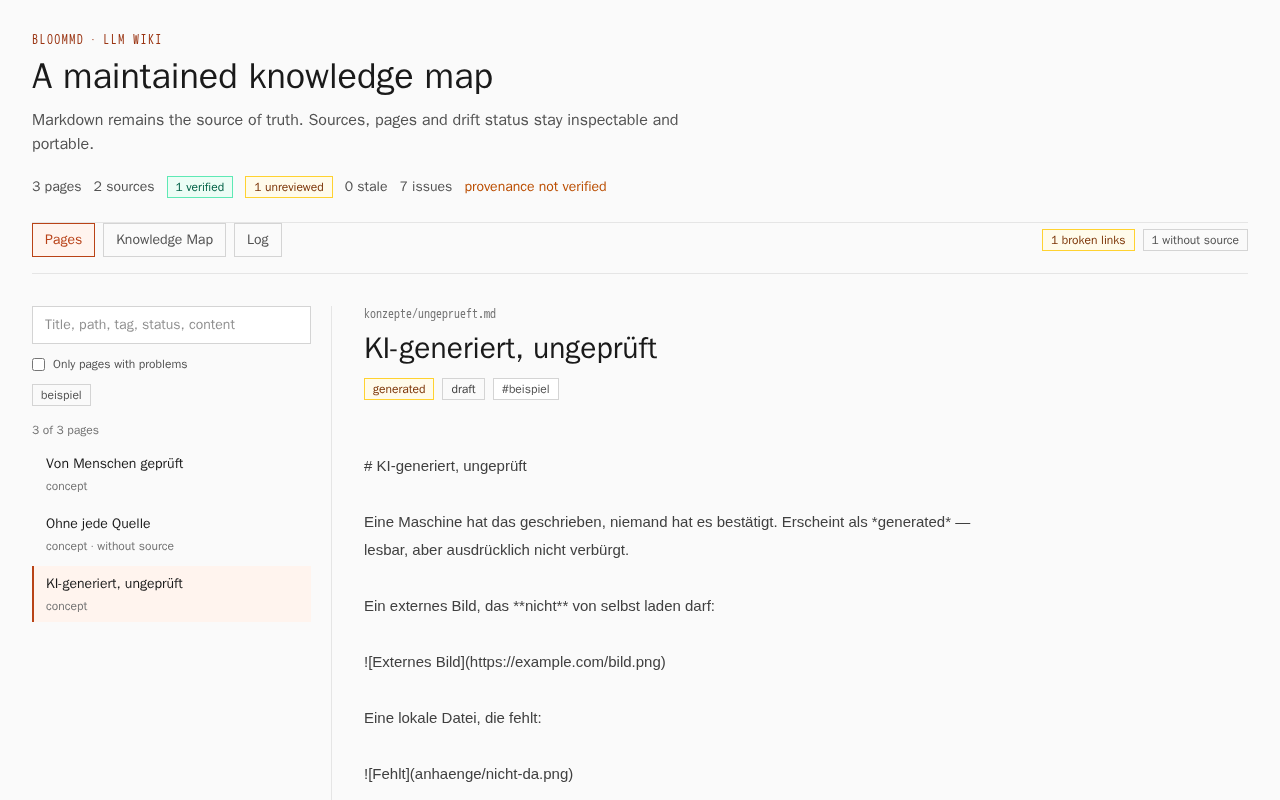
- Header: the number of pages and sources, plus verified, unverified, stale, and the number of issues. If it says provenance not verified, the view has no source hashes to compare against, and only shows what the pages themselves state.
- Three views: Pages (list and page text), Knowledge Map (pages as nodes, links as edges), and Log (the bundle's log).
- Search and filter: Search covers title, path, tag, status, and content. Only pages with problems shows pages without a source, with a changed source, with findings, or with missing media; tags filter further.
- Per page: the path, the trust tier as a badge (verified, generated, unattributed), the status, the tags, and the citations. A source without a hash carries the note without hash — drift cannot be detected.
The Wiki view at /wiki is off by default. It only runs when the operator turns it on and provides
a bundle; otherwise it says "Wiki is not enabled here".
Creating and checking a bundle
With the optional command-line tool bloommd-wiki (download and checksum:
Command-line tools):
- Create the bundle:
bloommd-wiki init ./wiki "Project knowledge". - Put pages in the folder as Markdown files and add sources and trust details to the frontmatter at the top (example below).
- Check the state:
bloommd-wiki status ./wikishows pages, sources, the number of reviewed, unreviewed, and unattributed pages, stale sources, and expired pages. - Findings in detail:
bloommd-wiki lint ./wiki. The command exits with code 1 as soon as there are findings, which suits a CI check. - Compare source hashes:
statusandlintaccept asource-hashes.jsonfile or, with--sources <folder>, a folder with the source files. Without either, the comparison stays off.
The head of a reviewed page looks like this:
---
type: concept
title: "Reviewed by a human"
status: stable
tags: [example]
sources:
  - id: source-1
    resource: "https://example.com/specification"
    contentHash: "sha256:aaaa1111"
    title: "The specification"
    retrievedAt: "2026-08-01"
verified:
  - by: "max"
    at: "2026-08-02T10:00:00Z"
---
A page with a generated entry (who, when) counts as AI-generated and unreviewed; a page without a
source counts as unattributed and shows up under Only pages with problems. The example above
mirrors part of the test bundle in the repository (test-wiki/), which the picture comes from.
Previews are opt-in
A Wiki page does not load external images automatically. A preview requires a click and names the server that will be contacted. Nothing leaves the page before that; otherwise merely reading a page would reveal who is reading what. Broken references and missing files remain visible.
AI proposals
An agent may propose changes but cannot write directly. Every proposal needs explicit approval,
and content hashes are checked again before applying it. A changed page causes the proposal to be
rejected instead of overwriting someone else's work. Proposals without a source are discarded. The
same rule applies to OpenAI, Anthropic, local models, and MCP clients. The flow
propose → approve → apply and the setup of an agent are described in
Let an agent file your notes.
What OKF does not do
- It does not check truth. OKF shows where a page comes from and whether its source changed. Whether a statement is right is still up to a person.
- It has no built-in model. The tools read, check, and report; pages are written by a person or by an agent you connect yourself, and that agent may only propose.
- There are no hosted autonomous agents. A proposal is never applied without a named approval.
- Hash comparison needs a counterpart. Without a hash file or a source folder, the view says
provenance not verified;
statusdoes not monitorhttp/httpssources itself. - The public Wiki view is not on everywhere. It needs the operator to enable it (see above).