Documentation
OpenClaw workspace agents
Install, securely pair and supervise local OpenClaw agents that work on individual BloomMD nodes.

BloomMD lets a local OpenClaw agent participate as a visible workspace member. It receives only its own assignments, works only with the selected node's context, and can return changes only as a proposal. A human still decides whether to apply it.
What you need
- A BloomMD workspace where you are an owner or editor.
- A locally running OpenClaw client with a configured model provider.
- An OpenClaw-supported Node.js runtime: at least
24.16or26.1(node --version). - Access to the machine running OpenClaw. BloomMD never opens an inbound connection to that machine.
The agent runs locally or in infrastructure you operate. BloomMD stores no model key and does not send an entire workspace to OpenClaw.
1. Install the plugin
The BloomMD plugin contains pairing commands, secure local token storage and the skill for node-scoped work. No separate BloomMD service needs to keep running.
curl -fL https://bloommd.io/openclaw-plugin/latest.tgz \
  -o ~/Downloads/bloommd-openclaw-plugin.tgz
openclaw plugins install ~/Downloads/bloommd-openclaw-plugin.tgz \
  --force
latest.tgz is revalidated within one minute after a new release. For reproducible installations or rollbacks, use the immutable URL https://bloommd.io/openclaw-plugin/<version>.tgz, for example …/0.4.4.tgz. Then confirm that OpenClaw sees the plugin:
openclaw bloommd --help
Development from a checkout:
openclaw plugins install --link ./plugins/openclaw --forcelinks the local plugin. It is intended for development, not the normal beta install path.
2. Invite and pair an agent
- Open a BloomMD workspace and choose Manage agents.
- Add an agent with a distinctive name, such as
ResearchorOpenClaw – Architecture. - Copy the one-time pairing code. It expires after 15 minutes and cannot be reused.
- Pass it only to the intended local OpenClaw instance. Store it in a private file so it never appears in shell history or a process listing:
umask 077
mkdir -p ~/.config/bloommd
# Paste the code, then finish with Ctrl-D.
cat > ~/.config/bloommd/pairing-code

openclaw bloommd pair \
  --server https://bloommd.app \
  --bloommd-profile research \
  --pairing-code-file ~/.config/bloommd/pairing-code
rm -f ~/.config/bloommd/pairing-code
The command saves the agent token in OpenClaw's local secret store. It never appears in Markdown files, Git or the BloomMD UI.
Verify the connection:
openclaw bloommd status --bloommd-profile research
3. Assign a node
Select the map node you want the agent to work on. When the workspace has an agent, a robot icon appears next to Add child and Edit.
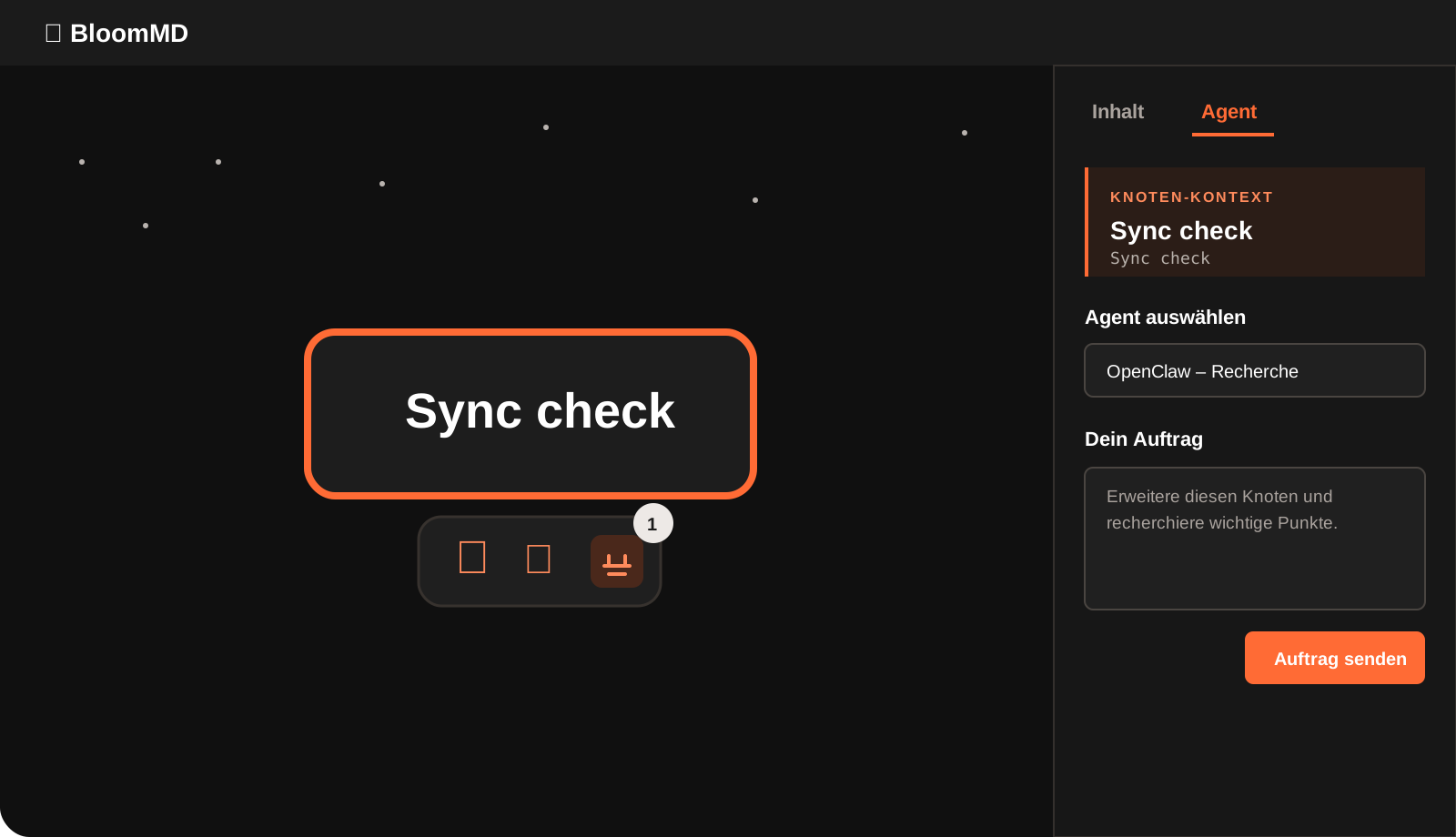
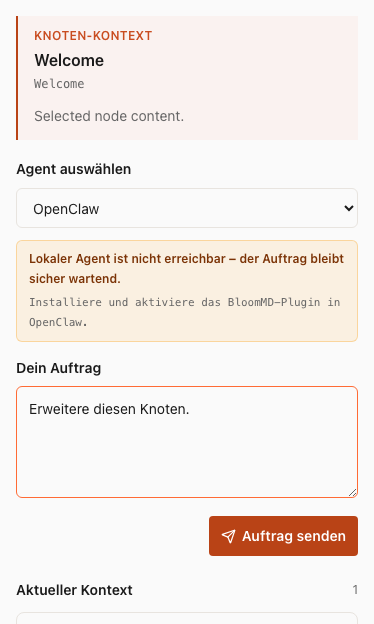
- Click the robot icon or open the Agent tab in the right sidebar.
- Choose the agent.
- Give it a concrete assignment, for example: “Expand this node with three testable questions and research reliable sources.”
- Send the assignment.
The assignment immediately appears as waiting for agent. The local plugin runner is woken through an outgoing realtime connection and claims only its own tasks. A model turn happens only for an open assignment, so idle agents do not consume model tokens. If a network blocks SSE, a sparse internal fallback poll protects delivery.
4. Review and apply a proposal
When the agent finishes, the right sidebar shows proposal ready. Use View proposal:
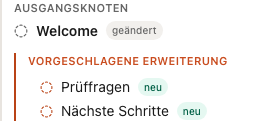
- In tree view, you see the new or changed structure as a tree.
- In Markdown view, you see the concrete Markdown proposal.
- The agent can explicitly propose typed tasks or decisions below that node. Both appear as new child nodes and only exist after you approve them.
- Colour and labels distinguish waiting, working, ready, applied, rejected and failed states.
Apply only after reviewing. Applying goes through BloomMD Sync, so other open clients receive the change as a normal workspace update. Earlier entries remain as collapsed history without obscuring the current decision.
Permissions, limits and revocation
An agent is not a human editor:
- It sees only its own assignments and, for node assignments, only that node's title, path and content.
- It cannot write a file directly. New child nodes are proposals too.
- Every assignment, result and decision is written to the workspace audit trail.
- Several agents can work in parallel; their tokens and assignments stay separated.
To deactivate an agent, open Manage agents, choose the entry and select Revoke access. Its next poll is rejected. You can remove the local profile too:
openclaw bloommd forget --bloommd-profile research
Docker and Kubernetes operation
You can run the plugin as a container for a persistent agent. You do not need access to the BloomMD repository: Dockerfile, Compose configuration and the Kubernetes manifest are downloaded directly from bloommd.io. The container requires only outbound HTTPS access to BloomMD and persistent secret storage for its token.
Docker Compose
Download the public configuration into a new private directory and pin the plugin to a published version for reproducible operation:
mkdir bloommd-openclaw && cd bloommd-openclaw
curl -fsSLO https://bloommd.io/openclaw-plugin/Dockerfile
curl -fsSLO https://bloommd.io/openclaw-plugin/entrypoint.sh
curl -fsSLO https://bloommd.io/openclaw-plugin/docker-compose.yml

cat > .env <<EOF
OPENCLAW_GATEWAY_TOKEN=$(openssl rand -base64 32)
BLOOMMD_PLUGIN_VERSION=0.4.4
BLOOMMD_PLUGIN_URL=https://bloommd.io/openclaw-plugin/0.4.4.tgz
EOF

docker compose up --build -d
Then create a one-time pairing code in BloomMD, save it locally with restrictive permissions, and pair the container:
umask 077
pbpaste > ./bloommd-pairing-code
docker compose cp ./bloommd-pairing-code bloommd-openclaw-agent:/tmp/bloommd-pairing-code
docker compose exec bloommd-openclaw-agent node /app/openclaw.mjs bloommd pair \
  --server https://bloommd.app \
  --bloommd-profile research \
  --pairing-code-file /tmp/bloommd-pairing-code
docker compose exec bloommd-openclaw-agent rm -f /tmp/bloommd-pairing-code
rm ./bloommd-pairing-code
Kubernetes
Build the same public Dockerfile into your own registry; this keeps registry and access decisions with your organization. Then download the public manifest, replace the image placeholder and create the Kubernetes secrets:
mkdir bloommd-openclaw && cd bloommd-openclaw
curl -fsSLO https://bloommd.io/openclaw-plugin/Dockerfile
curl -fsSLO https://bloommd.io/openclaw-plugin/entrypoint.sh
curl -fsSLO https://bloommd.io/openclaw-plugin/kubernetes.yaml

docker build \
  --build-arg BLOOMMD_PLUGIN_URL=https://bloommd.io/openclaw-plugin/0.4.4.tgz \
  -t registry.example.com/bloommd-openclaw-agent:0.4.4 .
docker push registry.example.com/bloommd-openclaw-agent:0.4.4

sed -i.bak 's#REPLACE_WITH_YOUR_REGISTRY/bloommd-openclaw-agent:0.4.4#registry.example.com/bloommd-openclaw-agent:0.4.4#' kubernetes.yaml
kubectl create namespace bloommd-agents --dry-run=client -o yaml | kubectl apply -f -
kubectl create secret generic openclaw-gateway -n bloommd-agents \
  --from-literal=token="$(openssl rand -base64 32)" \
  --dry-run=client -o yaml | kubectl apply -f -
kubectl apply -f kubernetes.yaml
For pairing, copy the one-time file into the started pod and delete it immediately afterwards:
umask 077
pbpaste > ./bloommd-pairing-code
pod=$(kubectl get pod -n bloommd-agents -l app.kubernetes.io/name=bloommd-openclaw-agent -o jsonpath='{.items[0].metadata.name}')
kubectl cp ./bloommd-pairing-code bloommd-agents/$pod:/tmp/bloommd-pairing-code
kubectl exec -n bloommd-agents "$pod" -- node /app/openclaw.mjs bloommd pair \
  --server https://bloommd.app \
  --bloommd-profile research \
  --pairing-code-file /tmp/bloommd-pairing-code
kubectl exec -n bloommd-agents "$pod" -- rm -f /tmp/bloommd-pairing-code
rm ./bloommd-pairing-code
Store model access and BloomMD tokens only through your platform's secret mechanism. Never put them into an image, repository or workspace file.
Troubleshooting
- Pairing code expired: create a new code in BloomMD and pair again.
- Agent remains waiting: run
openclaw bloommd status --bloommd-profile researchand make sure the local plugin runner is enabled. - Proposal cannot be applied: refresh the sidebar, reopen the proposal and look for a visible Sync error. If the source changed in the meantime, the proposal remains available for review.
- End access: revoke the agent in BloomMD, then run
openclaw bloommd forgetlocally.
Next: workspace collaboration or download BloomMD.