
BloomMD journal
Markdown stays the source, BloomMD makes structure visible
Why BloomMD starts with Markdown files and turns them into a navigable knowledge space.
When a note grows, its structure does not automatically become easier to see. The opposite is often true: a few headings turn into a long document where the relationships are still there, but difficult to grasp. That is where BloomMD starts: the Markdown file remains the source while its outline becomes a navigable map.
That distinction matters. BloomMD does not replace Markdown or introduce a new proprietary format. The visual layer is a working and orientation layer over a document that remains readable, versionable and useful in other tools.
The document stays the source
Many knowledge tools begin with a blank canvas. That can be useful for free-form exploration, but it often creates a second truth: ideas live in the map while the actual notes later have to be maintained in a document, wiki or repository.
BloomMD starts somewhere else. An existing Markdown file is already the starting point. It can be written in a text editor, versioned with Git or continued in Obsidian. BloomMD does not turn it into a black box; it reveals the structure that is already there as a visual working space.
The benefit is simple but important: even when the map is not available, the information remains in its original format. A document can be read linearly, searched, compared and shared. The map adds another perspective, making it easier to see where you are and which sections belong together.
Headings become orientation
Markdown headings are more than typographic sizes. They form a hierarchy:
# Product strategy
## Audience
## Value proposition
### Core problem
### Desired outcome
## Roadmap
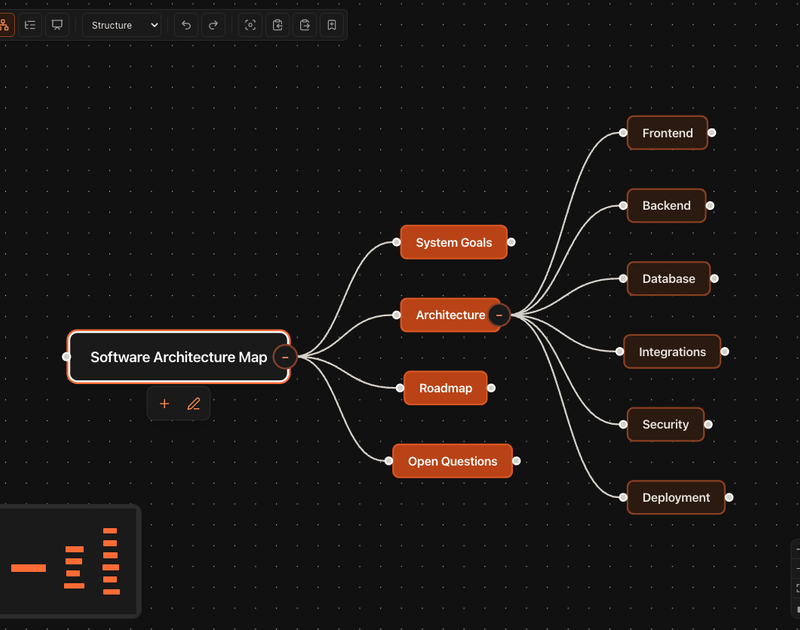
In a long document, that structure is present while reading but not always visible at a glance. BloomMD turns the levels into nodes and relationships. A main topic can become a starting point while its subtopics and neighboring sections remain visible.
This does not change the document’s content. It changes how you approach it. Instead of moving only from top to bottom, you can select an area, focus on a node and continue from there while keeping its place in the source understandable. That is especially useful for architecture notes, project plans, research questions and larger concepts: it becomes easier to see what is already developed and where open questions remain.
A practical workflow
The value comes from moving between writing and orientation:
- Capture in Markdown: ideas, headings and notes start in a normal file.
- Create structure: related content is organized with headings and levels.
- Open it as a map: BloomMD displays the hierarchy as a visual structure.
- Review relationships: move the focus through sections, open or extend nodes and keep their position in the document clear.
- Continue in the source: the Markdown file remains the shared reference for your editor, Git, Obsidian and BloomMD.
This workflow is deliberately practical. The goal is not to turn every note into a diagram. The goal is to gain a second perspective as a document grows, without giving up the workflow you already have.
Visibility without format lock-in
A map remains useful over time only when it does not become a dead end. That is why the separation between source and view matters. BloomMD is not a whiteboard whose content later has to be copied back into Markdown. The visual structure complements the file and keeps changes connected to an understandable Markdown workflow.
That makes trying BloomMD less risky. People already working with Git, VS Code, Obsidian or another Markdown editor do not have to replace their existing system. The file stays open and portable. BloomMD adds orientation where a linear representation reaches its limits.
At the same time, the quality of the map depends on the quality of the structure. A file without clear headings will not produce a useful hierarchy. BloomMD does not remove the editorial work. It makes the structure that is already in the document visible — and shows where that structure still needs attention.
A real-world example
Imagine planning a new product. In one Markdown file, you start collecting the audience, the problem, possible features, open questions and next steps. A linear list is enough at first. After a few working sessions, however, the information has several levels: some points belong to strategy, others to implementation, and others are still untested assumptions.
With a clear heading structure, the document can keep growing without forcing you to reorganize your thoughts from scratch. In the map, you can see which areas already have many branches and which topic is still isolated. A node can become the starting point for the next writing session. The file remains the place where details, reasoning and decisions are recorded.
That is the real value of a visual view: it does not replace thinking or writing. It reduces the time you spend finding your way through your own notes.
Which documents benefit most?
The visual view is particularly useful when a topic has several levels and perspectives, for example:
- product and project planning
- software architecture and technical decisions
- research, learning notes and knowledge collections
- book, article and content structures
- team and workspace documentation
For a short shopping list, a map would probably be overkill. For a document with many sections, open questions and dependencies, it can provide exactly the orientation that gets lost in linear reading.
The next step
Markdown does not have to choose between readability and overview. The file can remain the reliable source while BloomMD makes its structure visible and navigable.
Try it with one of your own files: open the BloomMD demo or read the documentation. For local folders, the desktop app is available for download.
The best test is a document that already exists and is slowly becoming harder to navigate. Open it, follow its structure and see whether the visual view helps you understand where you are and what you want to work on next.